
Did you know that with KamHost, you can create a professional email address for any domain you host? Setting up a custom email is quick and easy, allowing you to send and receive messages using your own domain. Unlike generic addresses like yourname@gmail.com, a domain-based email reinforces your brand and leaves a lasting impression on clients, partners, and customers. Follow these simple steps to create your email accounts:
Step 1: Log in to Your KamHost Control Panel
To get started, log in to your KamHost control panel using your hosting username and password. You can access the control panel here: https://cp.kamhost.com
Step 2: Open the Email Section
Once you’re logged in:
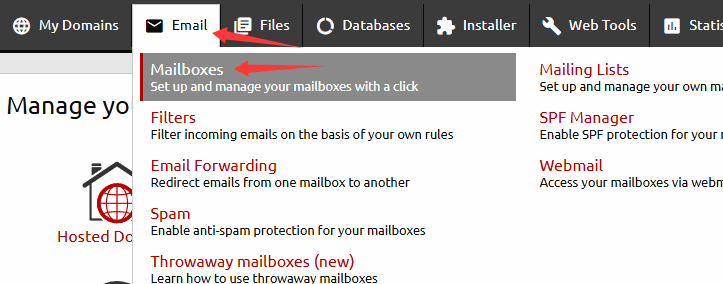
- Navigate to the Email section in the control panel menu.
- Select Mailboxes.
This is where you can create and manage all your email accounts for your hosted domains.
Step 3: Create a New Email Account
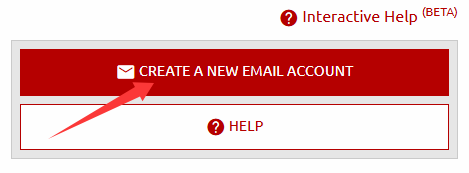
Click the “Create a New Email Account” button. A prompt window will appear where you can enter the details of your new email account.
Step 4: Enter Your Email Details
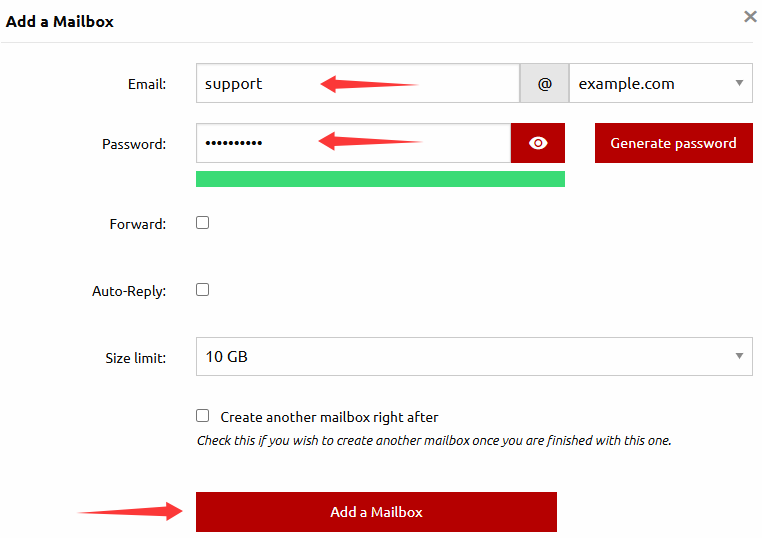
In the prompt window, provide the following information:
- Email Account Name: The part before the @ symbol (e.g., “info” for info@yourdomain.com)
- Password: Use a strong password to secure your mailbox
Once completed, click Add a Mailbox. Your new email account will now be active.
Step 5: Access Your Email
Your new email is ready to use! You can access it:
- Directly through webmail
- Or by configuring it in your preferred email client such as Outlook, Thunderbird, or Apple Mail
Why Use a Domain-Based Email?
Using an email address tied to your domain offers several benefits:
- Professionalism: Instantly looks more credible than generic email addresses.
- Branding: Reinforces your business name every time you send an email.
- Trust: Builds confidence with clients, partners, and customers.
Conclusion
With KamHost, creating a professional, branded email for any domain you host is simple and fast. Just log in to your control panel, go to Email → Mailboxes, create a new account, and start sending professional emails that reflect your brand.